
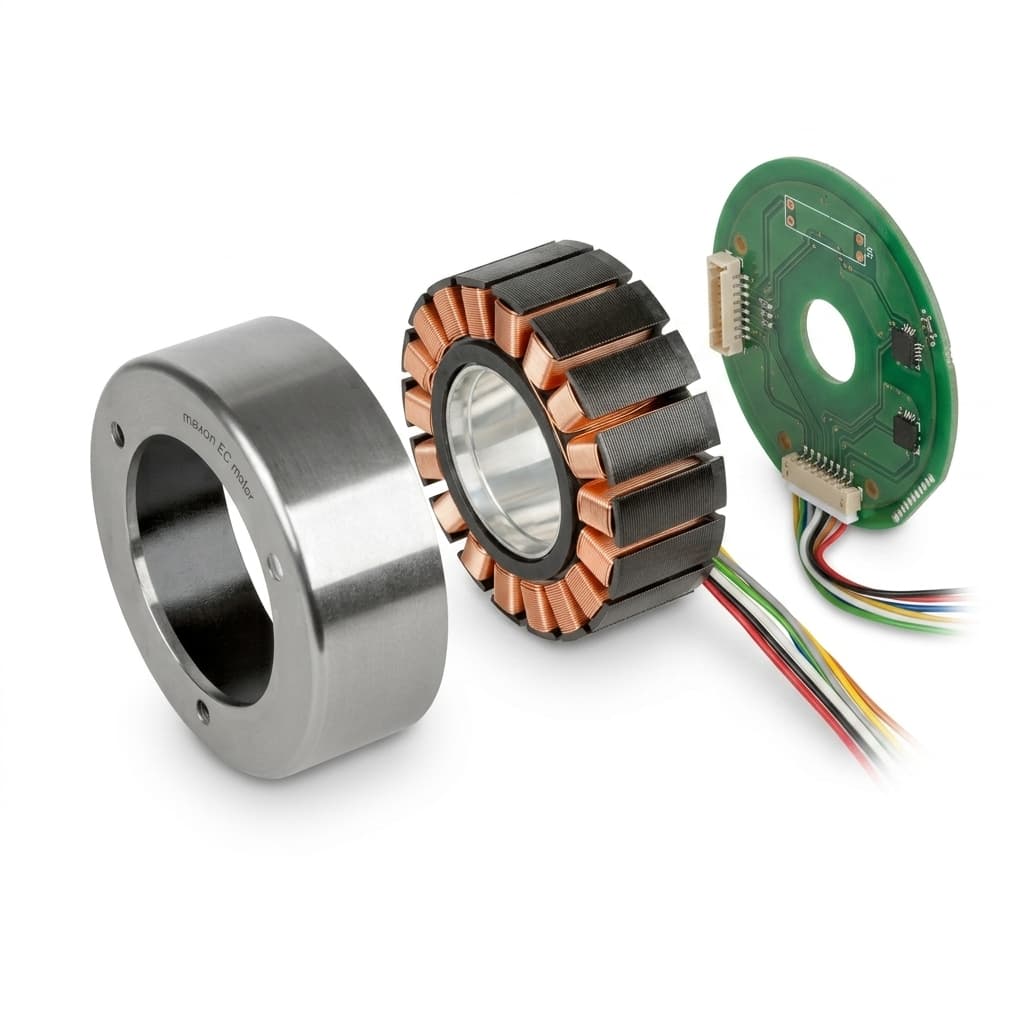
Frameless Servo Motor CAD Files: What Engineers Should Check Before Requesting STEP or IGES
A buyer-side guide to requesting frameless servo motor CAD files, including OD, ID, stack height, datum, cable exit, and revision controls before sample release.
For many frameless servo motor projects, the first serious engineering milestone is not a quotation. It is the CAD fit check.
Unlike a housed servo motor, a frameless servo motor kit becomes part of the customer's machine structure. The stator is pressed, clamped, bonded, or otherwise fixed into the housing. The rotor is mounted into the rotating member. Bearings, feedback, thermal path, wire routing, and mechanical datums are usually designed by the customer. That means a STEP file is useful only when the receiving engineer knows exactly what to verify.
We have seen projects delayed by 6-8 weeks because the buyer's CAD team used a preliminary STEP file as the manufacturing reference without verifying tolerance, cable exit, or revision status. In one case, a customer machined 20 aluminum housings to a bore diameter that matched the CAD nominal but was 0.04mm too tight for the actual stator batch due to supplier-side tolerance stacking. Every housing had to be re-bored.
This guide explains what to prepare before requesting CAD files for a frameless servo motor, torque motor, or hollow-shaft direct-drive motor.
Why CAD matters earlier for frameless motors
With a housed motor, the supplier controls the motor body, shaft, bearing arrangement, connector, and mounting face. The buyer checks whether the package fits.
With a frameless motor, the buyer's mechanism becomes the motor package. A small error in stator OD, rotor ID, stack length, cable exit, or datum assumption can create a late redesign. That is why CAD exchange should happen before sample purchase if the project has tight mechanical constraints.
Good CAD exchange helps the buyer answer four practical questions:
- Will the stator outer diameter fit the housing with the intended retention method?
- Does the rotor inner diameter preserve enough room for shaft, cable, optics, or pneumatic routing?
- Does the stack height leave enough axial space for bearings, encoder, seal, and mechanical preload?
- Can the cable exit, sensor interface, and thermal path work inside the real assembly?
Use this map to review the mechanical envelope, datum, thermal path, aperture, and cable clearance before sample release.
The diagram above is the minimum review map we recommend before a buyer treats a frameless motor CAD file as useful. The main point is that "fit" does not mean only stator OD and rotor ID. A realistic review includes datum control, heat transfer, harness direction, bearing space, encoder space, and the exact revision being quoted.
Minimum information to include in a CAD request
Before asking for STEP, IGES, SolidWorks, or Parasolid files, prepare a short engineering input package.
| Input | Why it matters |
|---|---|
| Target stator OD | Defines housing bore, retention concept, and thermal contact area. |
| Required rotor ID | Protects cable pass-through, shaft clearance, or optical aperture. |
| Stack height limit | Controls axial packaging and torque capability. |
| Continuous and peak torque point | Prevents selecting a package that fits mechanically but fails thermally. |
| Bus voltage and controller type | Impacts winding choice and expected torque-speed range. |
| Cable exit direction | Avoids harness conflict after the mechanical envelope is frozen. |
| Feedback sensor plan | Changes rotor/housing interface and available axial space. |
| Drawing revision | Keeps all teams aligned on the exact interface under review. |
If some values are not final, mark them as provisional. A useful CAD review can still begin, but the supplier should know which constraints are fixed and which are still open.
What to inspect in the CAD model
Stator OD and housing datum
The stator OD is not just a catalog number. It defines the mechanical fit, concentricity expectation, retention method, and heat transfer path. If the stator is potted, sleeved, or clamped, the CAD review should include the contact area and the housing wall thickness around it.
Check whether the drawing defines the same datum system your mechanical team uses. If the supplier and buyer use different reference surfaces, the numbers can look correct while the assembly still fails.
Here is a practical tolerance stack-up example for a 90mm stator:
| Dimension | Nominal | Tolerance | Worst Case |
|---|---|---|---|
| Stator OD | 90.000 mm | +0.000 / -0.020 mm | 89.980 mm (minimum) |
| Housing bore ID | 90.000 mm | +0.025 / +0.005 mm | 90.025 mm (maximum) |
| Maximum gap | 0.045 mm | ||
| Minimum gap (tightest fit) | 0.005 mm |
A 0.045mm gap filled with air has the same thermal resistance as 3mm of thermal epoxy. If you plan to use a slip-fit with potting, specify the maximum acceptable gap (typically 0.05-0.10mm) and require the supplier to confirm OD tolerance before shipment. If you plan to shrink-fit, the minimum interference should be agreed upon to avoid assembly damage.
Rotor ID and through-hole clearance
For robot joints, gimbals, medical devices, and lab automation, the center aperture is often the reason to choose a frameless motor in the first place. Do not check the nominal rotor ID only. Check the full stack of shaft, cable bundle, sensor hardware, retaining parts, and dynamic clearance.
For hollow-shaft programs, add a routing sketch to the CAD request. A simple section view can prevent several rounds of avoidable file exchange.
Stack height and axial interfaces
Increasing stack height usually improves torque capacity, but it also consumes axial space. A realistic CAD review should place the motor kit together with bearing seats, encoder components, seals, retaining rings, fasteners, and assembly tools.
If the motor is selected only from torque requirements, it may become mechanically impossible to package. If it is selected only from size requirements, it may fail continuous-duty thermal requirements.
Cable exit and sensor integration
Cable exit direction is one of the most common late-stage conflicts. The model should show where phase leads, hall sensors, thermal protection, or encoder wiring can exit without bending radius problems.
If the project requires a custom connector, harness length, shield termination, or special routing path, put that in the first CAD request instead of waiting for the final RFQ.
CAD file formats: what to ask for
Most buyer teams request at least one neutral format and one native or workflow-friendly format.
| Format | Typical use |
|---|---|
| STEP | General mechanical exchange across most CAD platforms. |
| IGES | Legacy exchange or surface-level compatibility. |
| Parasolid | Useful for many mechanical CAD workflows. |
| SolidWorks | Useful when buyer and supplier both manage native revisions. |
| 2D PDF/DXF | Fast review for dimensions, datums, and tolerance notes. |
For early evaluation, a simplified envelope model may be enough. For sample release, the buyer should request the project-controlled revision with drawing code, effective date, and scope notes.
What a useful CAD package should contain
A useful CAD package is more than one STEP file. For frameless servo motor programs, the buyer usually needs both mechanical geometry and interface context.
| Package item | Buyer use |
|---|---|
| Simplified STEP model | Fast envelope check and early layout review. |
| Detailed STEP/Parasolid model | Assembly interference check with housing, rotor carrier, bearing, encoder, and cable path. |
| 2D dimensional drawing | Critical OD, ID, stack height, datum, and tolerance review. |
| Interface note | Explains which surfaces are reference datums and which dimensions are provisional. |
| Cable and sensor exit sketch | Prevents harness conflict and bend-radius issues. |
| Revision log | Shows what changed between CAD versions and which revision is valid for sample release. |
| Option note | Confirms whether the file matches the proposed winding, stack, aperture, and connector option. |
For an early preselection stage, a simplified STEP plus dimensional PDF may be enough. For sample release, the buyer should request the full controlled package.
Example CAD revision naming
Version control is not paperwork. It protects both engineering teams from building against different assumptions.
A practical naming convention can look like this:
| File | Meaning |
|---|---|
| FSM-KIT-090-052-030-W2-REV-A.step | 90 mm OD, 52 mm ID, 30 mm stack, W2 winding, first review release. |
| FSM-KIT-090-052-030-W2-REV-B.step | Same baseline with updated cable exit or tolerance note. |
| FSM-KIT-090-052-040-W2-REV-A.step | Different 40 mm stack option, not interchangeable with 30 mm package. |
| FSM-KIT-090-052-030-W3-REV-A.step | Different winding option, may change electrical package and lead assumptions. |
The exact code can differ by supplier, but the rule is the same: the file name and drawing title block should help the buyer identify size, option, and revision without guessing.
Avoid treating downloaded CAD as final release data
Public or preliminary CAD files are often baseline references. They help the buyer evaluate fit, but they should not automatically become the manufacturing authority.
Before releasing samples, align these items:
- Drawing revision and effective scope.
- Tolerance notes for OD, ID, stack height, and critical datums.
- Cable, connector, sensor, and thermal interface assumptions.
- Version control method if engineering changes happen after sample approval.
- Whether the CAD package matches the exact winding and motor option being quoted.
Common integration failure modes CAD can prevent
Failure mode 1: the stator fits, but heat transfer is weak
The bore may accept the stator, but the housing contact area is too small or interrupted by pockets, slots, or thin wall sections. The motor passes the mechanical fit check but fails continuous torque after assembly.
We encountered this on a 60mm OD motor for a collaborative robot wrist joint. The customer's housing had lightening pockets machined into the bore wall to reduce weight. The stator OD touched only 40% of the bore surface. The winding temperature exceeded 140°C within 8 minutes at 70% of the catalog continuous torque. After filling the pockets with thermal epoxy and increasing contact area to 85%, the same motor ran indefinitely at full continuous load with a winding temperature of 92°C.
CAD review should include the thermal contact surface, not just the nominal OD.
Failure mode 2: the rotor ID is large enough on paper, but not in the real assembly
The rotor ID may satisfy the shaft requirement, but the full assembly also needs encoder hardware, cable bundle clearance, fasteners, retaining rings, and dynamic runout margin.
For hollow-shaft programs, review the actual through-path, not only one cross-section.
Failure mode 3: cable exit conflicts with the housing
The motor body fits, but phase leads or sensor wires exit toward a wall, bearing carrier, seal, or moving component. This can force a late harness redesign or unsafe cable bend radius.
Ask for cable exit orientation before prototype release.
Failure mode 4: the wrong revision goes to sample build
One team checks REV.A while another team quotes or manufactures REV.B. This can happen when CAD exchange moves through email threads without a revision log.
Always pair CAD with drawing revision and effective scope.
Buyer-side CAD review checklist
Use this checklist before approving sample release:
| Review item | Pass condition |
|---|---|
| OD and housing interface | Stator OD, retention method, and housing datum are confirmed. |
| Rotor ID and through-path | Shaft, cable, optics, or pneumatic routing has real clearance. |
| Stack height | Bearings, encoder, seals, and assembly tools fit axially. |
| Cable exit | Phase leads and sensor lines avoid bend-radius and interference issues. |
| Thermal contact | Housing material, contact area, and duty-cycle assumptions are reviewed. |
| Feedback integration | Encoder/resolver/hall package has space and datum alignment. |
| Drawing revision | CAD, 2D drawing, quotation, and sample plan reference the same revision. |
| Open points | Provisional dimensions are documented instead of hidden. |
Scoring CAD readiness before RFQ
If several suppliers send CAD files, score them by usefulness rather than file availability alone.
| CAD readiness signal | Weak supplier response | Strong supplier response |
|---|---|---|
| File scope | Sends one generic STEP file with no notes. | Sends simplified model, dimensional PDF, option note, and revision scope. |
| Mechanical datum | Datum surfaces are unclear. | Datum references are labeled and consistent with drawing notes. |
| Thermal interface | No mention of heat path. | Housing contact and thermal assumption are called out. |
| Cable routing | Cable is omitted or shown generically. | Cable exit direction and sensor lead routing are shown or described. |
| Revision control | Files are sent through email with no version log. | File naming, drawing code, and revision log are aligned. |
| Engineering support | Supplier expects buyer to interpret everything alone. | Supplier asks for OD/ID/stack, torque-speed, voltage, and application context. |
This scoring approach is useful because a free CAD download can look convenient but still create risk if the file is not tied to a real product option or revision.
A practical CAD request message
A strong first message is short but specific:
Hello Frameless Servo team, we are evaluating a frameless servo motor kit for a compact robot joint. Please share STEP/IGES files for initial packaging review. Our target envelope is OD under 90 mm, rotor ID above 50 mm, stack height around 30 mm, 48 V bus, and continuous torque target around 1.5 N·m. Cable exit direction and encoder package are still under review.
This kind of request gives the supplier enough context to send useful files and flag risks early.
How Frameless Servo handles CAD requests
Frameless Servo supports CAD requests through project-specific review rather than anonymous mass download. This is intentional. For frameless motors, CAD without application context can lead to wrong assumptions about thermal path, winding, cable routing, or revision status.
For fastest handling, send:
- Application scenario.
- OD, ID, and stack limits.
- Continuous and peak torque-speed points.
- Bus voltage and controller assumptions.
- Sample quantity and target timeline.
You can start from the CAD Download Center, review product families in Products, or contact the sales engineering team through Contact / RFQ.
Author

Categories
More Posts
How to Read a Frameless Servo Motor Torque-Speed Curve Before You Select a Motor
Learn how engineers should interpret continuous torque, peak torque, bus voltage, thermal limits, and duty cycle when reading torque-speed curves for frameless servo motors.
Back-EMF Testing for Frameless Motors: Why It Matters in Supplier Quality Control
A practical guide for OEM buyers on using Back-EMF waveform, phase difference, THD, resistance, and insulation checks to qualify frameless motor suppliers.
How to Address Cogging Torque in Frameless Servo Motors: Slotted vs. Slotless Designs
A comprehensive engineering and procurement guide to evaluating cogging torque in direct-drive frameless servo motors. Compare slotted and slotless designs for precision applications.